
Dub your video into another language with AI
Vyexa Dubbing is an AI video dubbing service: you upload a video, choose a language and get the same video back with a new voice. It dubs into 12 languages: English, Russian, Ukrainian, Spanish, German, French, Polish, Turkish, Arabic, Indonesian, Japanese and Korean. The original can be in almost any language, the service detects it by itself.
The background music and sounds stay, only the speech is replaced. If there are several speakers, each gets a voice of their own that is similar to theirs and keeps it to the end of the video.
No card needed. 10 free minutes once per person.
Listen to an example
One video, several languages. Switch the language — the video keeps playing from the same moment.
Dubbed automatically by Vyexa Dubbing, no manual editing. Source: NASA (public domain).
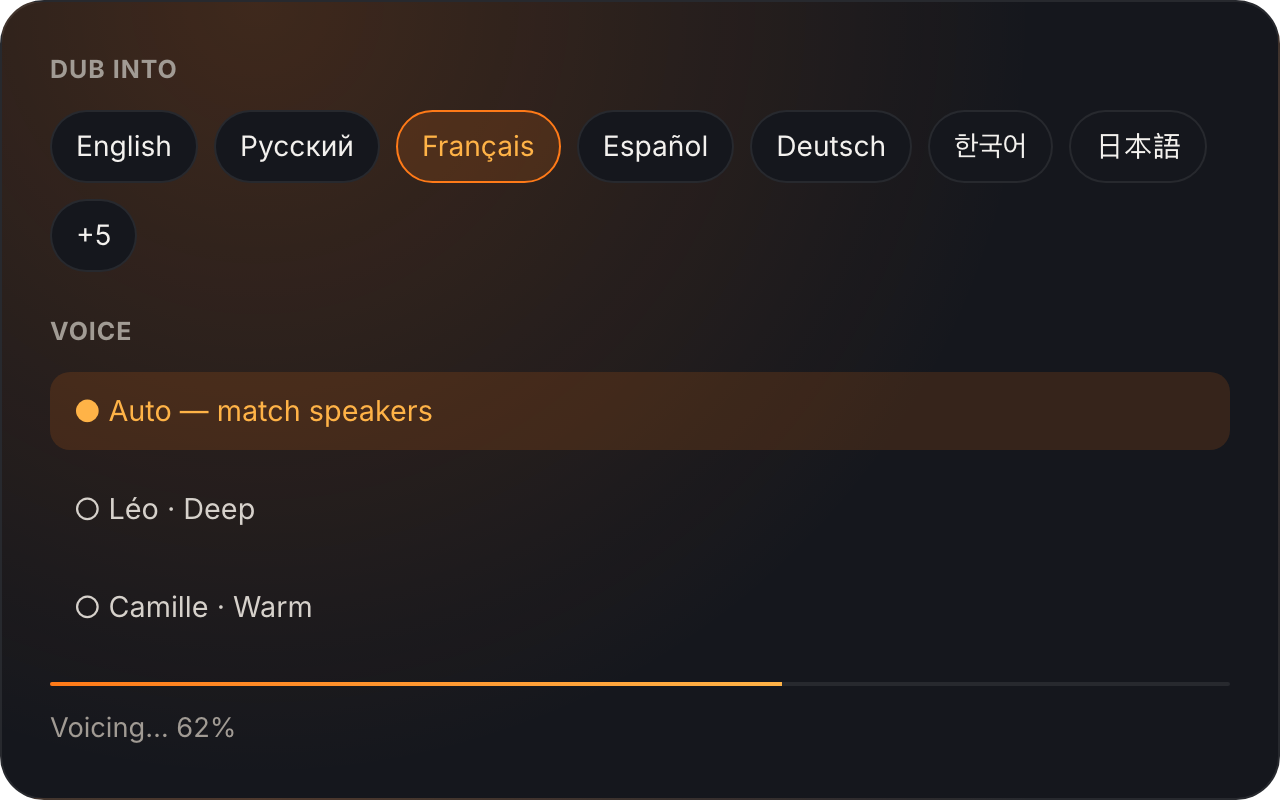
How AI video dubbing works
- Upload the video. MP4, MOV, WEBM or MKV. Free accounts take videos up to 3 minutes.
- Choose the language. Pick one of the 12 languages and leave the voice on Auto, or set a voice per language yourself.
- Download the result. You get an MP4 with the same picture and length, plus the dubbed audio as a separate M4A track and a subtitles file (.srt).
Dub a YouTube video into English (or another language)
If the video is yours, you do not have to publish a second channel. Dub it, download the M4A track and add it in YouTube Studio as an extra audio language: one video, several languages. Viewers pick the track in the player settings.
Only dub a video you have the right to dub. You are responsible for the content you upload.
What AI dubbing does not do
- There is no lip-sync. It is a voice-over, like a translation on TV: the new voice sits on the original timing and the lips stay as they were.
- Videos are kept for 7 days and then deleted automatically; you can delete one earlier.
- Length limits per video: Free up to 3 minutes, Plus up to 15, Pro up to 30.
- Plans are paid with USDT (TRC-20) directly or with other cryptocurrency through NOWPayments, no card payment.
Pricing
You pay per minute of video: 1 credit = 1 minute, rounded up, so a 2:10 video costs 3 credits. Credits are taken when dubbing starts and returned automatically if it fails.
Free: 10 minutes once, no card. Plus: $5 for 30 days, 60 credits. Pro: $15 for 30 days, 200 credits, which is about $0.075 per minute. Unused credits stay on the balance.
Looking for clip plans instead? See Vyexa pricing for the clip maker.
How to dub YouTube into English step by step
A step-by-step walkthrough: upload the video, pick the language, check the voice and download the dubbed MP4.
Dub, then cut into Shorts
Dubbing and clipping are two separate services. In Vyexa you cut a long video into vertical shorts, in Vyexa Dubbing you voice the video in another language. A common order: dub the full video, then upload the dubbed MP4 to Vyexa and let it find the best moments. They have separate accounts and balances.
FAQ
How does AI dubbing work?
We recognize the speech in your video, translate it and voice it with natural AI voices. The original voice is separated from the background, so music and sounds stay. You get the same video back, same length and picture, new voice.
Is there lip-sync?
No. It is a voice-over, like a professional translation on TV: the new voice is placed over the original timing. Lips are not changed.
Can I add the dub as an extra audio track on YouTube?
Yes. Besides the MP4 you can download the audio track separately (M4A, same length as the video) and add it in YouTube Studio as an extra audio language. There is also a voice-only track without music and sounds for your own editing.
Which languages are supported?
English, Russian, Ukrainian, Spanish, German, French, Polish, Turkish, Arabic, Indonesian, Japanese and Korean. The original video can be in almost any language, it is detected automatically.
Is there a free trial?
Yes, 10 free minutes after sign-up, once per person. No card needed.