
Vyexa API
Send a video link — get back vertical short clips with burned-in subtitles. One POST, one poll, one download. Built so an agent can use it without a browser.
Start in two minutes — free
You do not need to talk to sales or wait for approval. Create an account, generate a key in your dashboard, and send your first request.
- Create a free account at vyexa.net — no card required.
- Open Dashboard → API keys, click Create key and copy it. The key is shown once.
-
Send your first job with the curl below and poll the returned
status_urluntil the clips are ready.
curl -X POST https://vyexa.net/api/v1/jobs \
  -H "Authorization: Bearer YOUR_KEY" \
  -H "Content-Type: application/json" \
  -d '{"url": "https://example.com/video.mp4", "num_clips": 3}'
The free plan works through the API on exactly the same terms as on the website. You get free clips every month, and API clips are drawn from the same balance. Free-plan clips carry a watermark and the source video length is capped; paid plans remove the watermark and raise the limits. Nothing about billing changes because you call the API instead of the web app — the clips also show up in your dashboard under My Videos.
Use with Claude, Cursor, n8n MCP
Vyexa is also a remote MCP server (Streamable HTTP) at
https://vyexa.net/mcp. It wraps this same API — same key, same balance,
same limits — and gives an agent four tools: create_clips, get_job,
list_clips, get_options. Get a free key in
Dashboard → API keys, then:
Claude Code
claude mcp add --transport http vyexa https://vyexa.net/mcp \
  --header "Authorization: Bearer YOUR_KEY"
Claude Desktop
Settings → Connectors → add a custom connector, or use the mcp-remote bridge in claude_desktop_config.json:
{
  "mcpServers": {
    "vyexa": {
      "command": "npx",
      "args": ["-y", "mcp-remote", "https://vyexa.net/mcp",
               "--header", "Authorization: Bearer YOUR_KEY"]
    }
  }
}
Cursor (~/.cursor/mcp.json)
{
  "mcpServers": {
    "vyexa": {
      "url": "https://vyexa.net/mcp",
      "headers": { "Authorization": "Bearer YOUR_KEY" }
    }
  }
}
curl
curl -X POST https://vyexa.net/mcp \
  -H "Authorization: Bearer YOUR_KEY" \
  -H "Content-Type: application/json" \
  -d '{"jsonrpc":"2.0","id":1,"method":"tools/call","params":{"name":"create_clips","arguments":{"url":"https://example.com/video.mp4","num_clips":3}}}'
n8n — HTTP Request node
Import this node (Workflow → paste) or set the same fields by hand. Poll with a second node on GET /api/v1/jobs/{{ $json.job_id }} until status is completed or partial.
{
  "nodes": [{
    "name": "Vyexa: create clips",
    "type": "n8n-nodes-base.httpRequest",
    "typeVersion": 4.2,
    "position": [0, 0],
    "parameters": {
      "method": "POST",
      "url": "https://vyexa.net/api/v1/jobs",
      "sendHeaders": true,
      "headerParameters": { "parameters": [
        { "name": "Authorization", "value": "Bearer YOUR_KEY" }
      ]},
      "sendBody": true,
      "specifyBody": "json",
      "jsonBody": "={ \"url\": \"{{ $json.video_url }}\", \"num_clips\": 3 }"
    }
  }],
  "connections": {}
}
Machine-readable: /openapi.json (OpenAPI 3.1), /.well-known/mcp.json (MCP server card), /llms.txt.
What it does
You submit any public video link — a post on TikTok, YouTube, Instagram, Vimeo, Twitch and other platforms, or a direct link to a video file on your own storage. Vyexa downloads it, finds the strongest moments with AI, and renders them as 9:16 clips with a title and subtitles. You poll one endpoint until the clips are ready, then download the MP4s.
- Async by design — every job returns immediately with a
job_id. - Clips are rendered, not just cut: framing, titles and subtitles are applied.
- Subtitle segments with timings can be returned as JSON alongside the video.
- Everything is JSON except the clip download, which is the MP4 stream.
Base URL and authentication
Base URL: https://vyexa.net. Every request needs a bearer token:
Authorization: Bearer vx_your_api_key
Requests without a valid, active, non-expired key get 401.
Keys are issued per account — clips created through the API also appear in that
account's dashboard and are billed against its clip balance. Generate one yourself in
Dashboard → API keys
(up to 5 keys per account, valid for one year, revocable at any time).
- Treat the key like a password: server-side only, never in client-side code or a public repo.
- We store only a hash of it. If you lose it, we issue a new one — we cannot recover the old.
- Keys expire (1 year by default) and can be revoked at any time.
- Always call the API over HTTPS.
Quick start
1. Create a job.
curl -X POST https://vyexa.net/api/v1/jobs \
  -H "Authorization: Bearer vx_your_api_key" \
  -H "Content-Type: application/json" \
  -d '{
    "url": "https://example.com/video.mp4",
    "language": "en",
    "num_clips": 5,
    "segment_duration": 50
  }'
{
"success": true,
"job_id": 123,
"status": "pending",
"status_url": "https://vyexa.net/api/v1/jobs/123"
}2. Poll the status URL until status is
completed, partial or failed. Every 10–15 seconds is plenty.
curl https://vyexa.net/api/v1/jobs/123 \
  -H "Authorization: Bearer vx_your_api_key"
3. Download the clips from the download_url of each item.
curl -L -o clip.mp4 \
  -H "Authorization: Bearer vx_your_api_key" \
  https://vyexa.net/api/v1/clips/A3HK7Z2Q/download
POST /api/v1/jobs
Creates a clipping job. Responds 202 Accepted; work happens in the background.
| Field | Type | Required | Description |
|---|---|---|---|
url | string | yes | Link to the source video: a post on TikTok, YouTube, Instagram, Vimeo,
Twitch and other platforms, or a direct https:// link to a
video file. It has to be reachable without a login. |
language | string | no | Spoken language of the source (en, uk, pl, …). Omit or send auto to detect it. |
num_clips | int | no | How many clips you want. This is a ceiling, not a promise: weak moments are dropped before rendering, so you may get fewer. You are only billed for clips actually delivered. |
segment_duration | int | no | Clip duration in seconds. Fixed set: 30, 50,
90 — and it is plan-gated: free 30, Creator 30/50,
Pro 30/50/90. Anything else is rejected, never silently changed:
a value outside the set returns 422 invalid_clip_duration,
a valid value above your plan returns
422 clip_duration_not_in_plan. Omit the field to let us
choose. |
generate_title | bool | no | Generate an AI title for each clip. Default true. |
title | string | no | Fixed title for every clip instead of AI ones. Max 32 characters —
that is what fits the title bar of a vertical short (70 when
constructor.title_style is newsline: a quote on
per-line bars). Longer strings are trimmed, not rejected. |
highlight_color | string | no | Accent color of the active subtitle word and the title highlight. Either a
catalog id (FFD600, 40BFC3, FFFFFF+FFD600 …,
full list in GET /api/v1/options → job_options.highlight_color.values)
or any HTML color #RRGGBB, e.g. "#1E90FF"; a pair
"#1E90FF+#FFFFFF" alternates two accents. Omit to use your account
setting. Anything else returns 422 invalid_highlight_color. The applied
value is echoed as highlight_color in the job status. |
profanity_censor | bool | no | Censor swear words in this job: they are masked in the subtitles
(f***) and bleeped in the audio. Omit it to use your account
setting (off by default); true/false overrides that
setting for this job only, including later edits of its clips. Anything
other than a boolean returns 422 invalid_profanity_censor.
Detection is dictionary-based (en, ru, uk, pl, de, fr, es, it) and
best-effort. |
constructor | object | no | Look and framing — see below. |
logo | object | no | Your logo burned into every clip, in one of 9 positions. Paid plans only — see Your logo on clips. |
The constructor object
| Field | Default | Accepted values | What it controls |
|---|---|---|---|
layout | auto |
auto, full, frame_70, frame_50, frame_40, dual, streaming, lesson |
How the 16:9 source is framed into 9:16. |
subtitle_style | default |
default, none, karaoke, simple, big, minimal, highlighter, focus, popline, backdrop, glow, punch, beasty, stack |
Subtitle animation and look. none renders no subtitles. |
title_style | clean |
clean, box, chip, box_accent, newsline, outline, off |
Title treatment. off renders no title. |
font | montserrat |
montserrat, rubik, russo |
Typeface for titles and subtitles. |
subtitle_position | auto |
auto, bottom, middle, top |
Where subtitles sit. auto follows the layout. |
An unknown value is not an error — it silently falls back to the default for that
field. Still, do not hardcode these lists: we add styles and layouts regularly.
GET /api/v1/options always returns the current set with a short
"when to pick this" note and content-type recommendations. Read it once at startup and
let your agent choose from it.
{
  "url": "https://example.com/video.mp4",
  "language": "en",
  "num_clips": 5,
  "segment_duration": 50,
  "generate_title": true,
  "highlight_color": "#1E90FF",
  "profanity_censor": true,
  "constructor": {
    "layout": "auto",
    "subtitle_style": "karaoke",
    "title_style": "clean",
    "font": "montserrat",
    "subtitle_position": "auto"
  }
}
Your logo on clips paid plans
Pass a logo object and we burn your logo into every clip of the job —
on top of the video, subtitles and title. Available on Creator and Pro.
A free-plan key that sends logo gets 403 logo_requires_paid_plan
right away, so you never receive clips without the logo you asked for.
| Field | Default | Accepted values | What it controls |
|---|---|---|---|
url | — | public https:// link |
Where to download the image. Must open without a login. Send either
url or base64, not both. |
base64 | — | base64 string, data:image/png;base64,… prefix optional |
The image itself, if it is not hosted anywhere. |
position | top-right |
top-left, top-center, top-right,
middle-left, center, middle-right,
bottom-left, bottom-center, bottom-right |
Vertical (top / middle / bottom) × horizontal (left / center / right).
top_right and right-top are accepted too. |
size | 18 | number, 5–30 |
Maximum logo width in % of the frame width. The height is also capped at 9% of the
frame height, so square or tall logos come out smaller — the logo stays compact
and never covers the picture. The real width is echoed as size_applied. |
margin | 4 | number, 0–15 |
Gap to the frame edge in % of the frame width. Ignored on the centered axis. |
opacity | 1 | number, 0.1–1 |
0.7–0.9 reads as a watermark rather than a sticker. |
Formats: PNG (transparency kept — the best choice), JPEG (no transparency, you get a rectangle with its background), WebP (static only) and GIF — animated GIFs move and loop for the whole clip. Up to 5 MB, sides 32–2000 px. Animated WebP is rejected — convert it to GIF.
We only accept logos. Photos, full screenshots and frames (an opaque image of
1280×720 or more), tall images (taller than 1.4× the width) and extreme banners (wider
than 8:1) are rejected up front with 422 not_a_logo or
422 logo_bad_aspect_ratio — before any work starts and before your daily
import quota is touched. Send the logo itself, ideally a PNG with a transparent background.
{
  "url": "https://example.com/video.mp4",
  "num_clips": 3,
  "logo": {
    "url": "https://example.com/brand/logo.png",
    "position": "top-right",
    "size": 20,
    "opacity": 0.9
  }
}
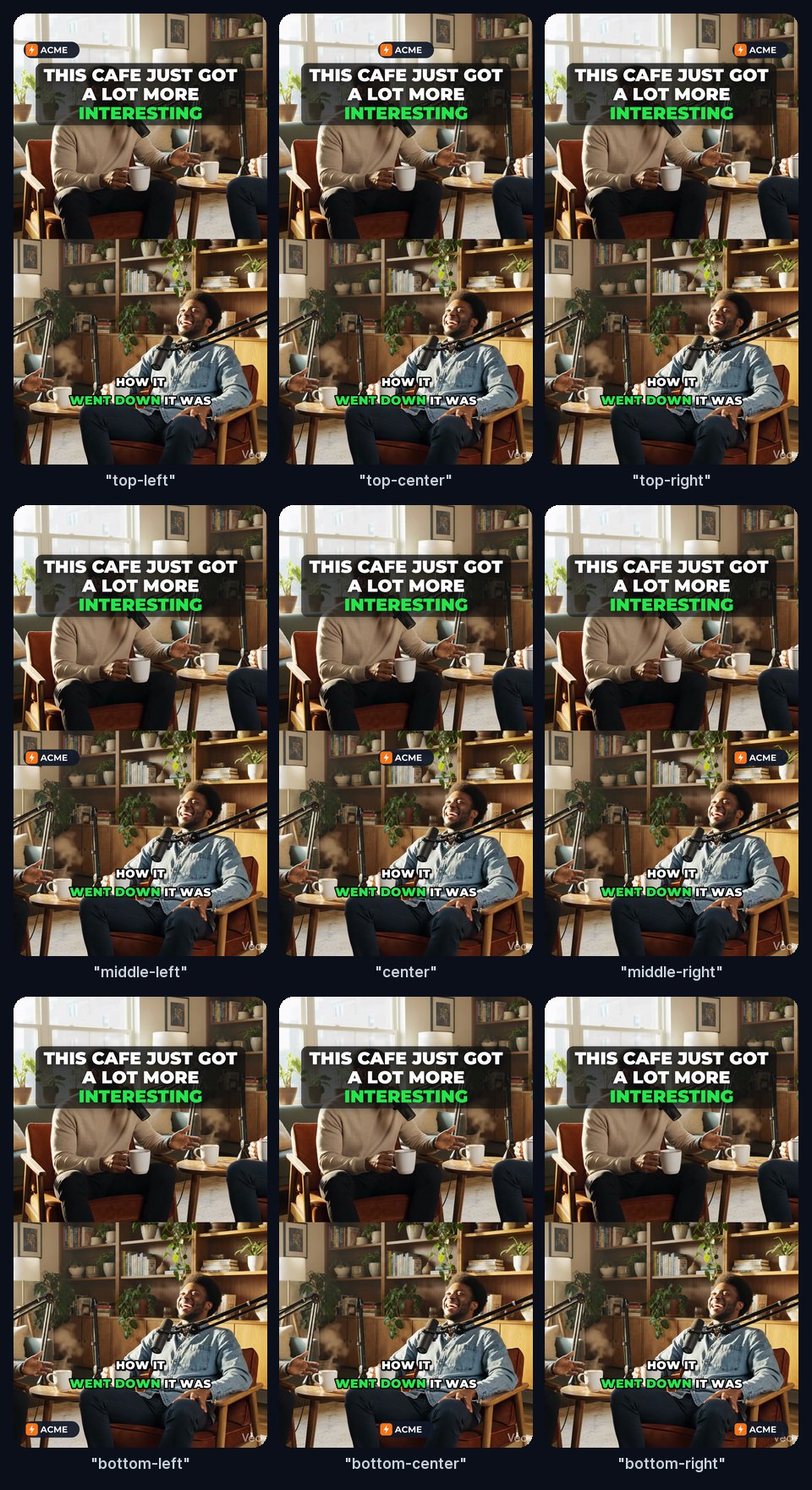
No logo at hand? Test with ours:
https://vyexa.net/images/api-docs/acme-logo.png
(PNG, transparent) or
https://vyexa.net/images/api-docs/acme-logo.gif
(animated GIF) — both pictures below were rendered with them.
The 9 positions (logo size: 22, default margin). The top row sits a little
below the edge, clear of the app tabs in TikTok/Reels, and the middle row slightly below
the center, so the logo does not land on a face:
An animated GIF logo, position: "top-right", size: 30:
Short-video apps draw their own buttons over the right edge and the caption over the
bottom ~15% of the frame. If the logo must stay visible in the feed, prefer the top row,
or raise margin for bottom positions. Bottom positions can also meet
subtitle_position: "bottom" — pick top or middle
subtitles, or a top logo.
The logo is saved with the job: clips re-rendered later through
POST /api/v1/clips/{clip_id}/edit keep it. If the plan lapses before a clip
renders, that clip comes out without the logo rather than failing. The applied settings
are echoed back as a logo block in both the create response and
GET /api/v1/jobs/{job_id}.
GET /api/v1/jobs/{job_id}
Job status and, once rendering starts, the clips produced so far.
status | stage | Meaning |
|---|---|---|
pending | importing | Downloading the source video. |
processing | generating | Rendering clips. |
completed | done | All clips ready. |
partial | done | Some clips ready, some failed. |
failed | import | Could not download the source. |
failed | done | Every clip failed to render. |
Add ?include_subtitles=1 to get subtitle segments with millisecond timings for each clip.
{
  "success": true,
  "job_id": 123,
  "status": "completed",
  "stage": "done",
  "clips_expected": 5,
  "clips_ready": 5,
  "clips_failed": 0,
  "profanity_censor": true,
  "logo": {
    "position": "top-right",
    "size": 20,
    "size_applied": 20,
    "margin": 4,
    "opacity": 0.9,
    "format": "png",
    "animated": false
  },
  "source": {
    "duration": 612.4,
    "source_language": "en",
    "available_languages": ["en", "uk"],
    "requested_language": "en",
    "recommended_clips": 7,
    "max_clips": 15
  },
  "clips": [
    {
      "id": "A3HK7Z2Q",
      "title": "The one habit that changed everything",
      "duration": 58.4,
      "download_url": "https://vyexa.net/api/v1/clips/A3HK7Z2Q/download"
    }
  ]
}
The source block is feedback for your next call: max_clips is the
hard ceiling for this video's length, and available_languages tells you which
language values actually exist in the source. It appears once the import
finishes, so it is absent while stage is importing.
profanity_censor is always present and shows the value actually applied
to the job: the one you sent, or your account setting if you sent none. When it is
true, subtitles returned by ?include_subtitles=1 carry the same
mask as the rendered clip.
Clip id is an opaque token, not a database id. Use it as-is.
GET /api/v1/clips/{clip_id}/download
Streams the MP4. Requires the same bearer token, and only returns clips that belong
to your account — anything else is 404.
GET /api/v1/clips/{clip_id}
Status of a single clip: processing, ready or failed,
plus download_url when ready. Use it to poll after an edit.
POST /api/v1/clips/{clip_id}/edit
Re-renders an existing clip in place — same id, new title and/or trim. Responds
202; poll the clip status endpoint until it is ready.
Each edit costs one clip from your balance, like a regeneration.
{
  "title": "New title",
  "trim": { "start": 0, "end": 21 }
}
Trim values are seconds relative to the clip. For a clip of length D:
start >= 0, end - start >= 1, end <= D.
An invalid range returns 422 invalid_trim and nothing is rendered or billed.
At least one of title or trim must be present. On edit
title must be 1..32 characters (1..70 for clips made with the newsline
title style) — unlike on job creation it is validated,
not trimmed, so a longer string returns 422 invalid_title.
GET /api/v1/options
Discovery endpoint. Returns every accepted value for the constructor fields
with a label, a "when to pick this" description and the content types it suits, plus a
small recommendations block mapping content type to a sensible layout and subtitle style.
Top-level job flags such as profanity_censor are listed under
job_options. Call it instead of hardcoding.
Errors and limits
Errors are JSON with a stable machine-readable error_code.
{
  "success": false,
  "error_code": "invalid_trim",
  "error": "Trim range is outside the clip."
}| Status | When |
|---|---|
401 | Missing, unknown, disabled or expired key. |
403 logo_requires_paid_plan | logo was sent with a free-plan key. |
404 | Unknown job or clip, or one that belongs to another account. |
409 | Clip is still rendering and cannot be edited yet. |
422 | Bad input — unsupported URL, invalid trim, nothing to edit, a non-boolean profanity_censor, a clip duration your plan does not allow, or a bad logo
(invalid_logo_position, invalid_logo_size, invalid_logo_margin,
invalid_logo_opacity, invalid_logo_url, logo_download_failed,
unsupported_logo_format, invalid_logo_dimensions, logo_too_large,
logo_bad_aspect_ratio, not_a_logo). |
429 rate_limit | Too many requests. Respect the Retry-After header. |
429 concurrent_limit | Another generation from this account is still running. Free accounts run one job at a time; paid accounts (Creator, Pro) run up to 5 in parallel. |
429 insufficient_balance | Running jobs have already reserved your whole clip balance. Wait for them to finish or top up. |
failed source_minutes_limit | Reported in the job status after import: the source video does not fit the monthly allotment of source video minutes of your plan (Free 200, Creator 1500, Pro 4000). Minutes are spent once per source video on its first generation; a window counts only its own length. Wait for the monthly reset or upgrade. |
failed source_duration_limit | Reported in the job status after import: on the Free plan a single source video is limited to 90 minutes. |
Rate limits are per key on a sliding window, separately for job creation, status polling, edits and downloads, plus a daily cap on how many source links you can import. If you need higher limits for a production integration, write to support@vyexa.net.
Poll status rather than hammering it: one request every 10–15 seconds per job is enough, and a job typically finishes in a few minutes depending on source length. There is also a per-IP burst cap, so do not fire dozens of requests in the same second — spread them out.
Balance is reserved up front
We will not start work we cannot deliver. Before a job is accepted we add up the clips
already promised by your unfinished jobs; once that reservation covers your whole
balance, the next job is refused with 429 insufficient_balance instead of
being transcribed and analysed for nothing.
The rule is deliberately forgiving at the edge: with a balance of 20, jobs of 10, 6 and 5 clips are all accepted (the last one may deliver one clip short), but a fourth job is refused. Wait for the running jobs to finish, or top up.
Notes for agent builders
- Read
GET /api/v1/optionsat startup and let the model picklayoutandsubtitle_stylefrom the descriptions. - Treat
num_clipsas an upper bound and handleclips_ready < clips_expectedas normal, not as an error. - Do not fan out beyond your limit: a free account runs one generation at a time, a paid account (Creator, Pro) up to 5 in parallel. Keep to that and do not fire bursts — they trip the per-IP cap.
- Treat
insufficient_balanceas "come back later", not as a retry loop — the balance frees up as running jobs finish. - Handle
clip_duration_not_in_planexplicitly: it means the request was fine but the account needs a higher plan — surface that to your user instead of retrying. - Use
source.max_clipsandsource.available_languagesfrom the first status response to correct your next request. partialis a success state — some clips are usable.- Store the clip
id; it stays stable across edits. - Audio is always the source audio. There is no voice-over or background-music option in the public API.
What you need to get started
- A Vyexa account — free, no card.
- An API key from Dashboard → API keys.
- A public video link — platform post or direct file — and anything that can send an HTTPS request.
That is it. Free clips are enough to test the whole flow end to end before you pay for anything. If you need higher rate limits or have a question about a production integration, write to support@vyexa.net.